


To increase their visibility and influence in the academic community, it is extremely important for researchers to have a profile on Google Scholar. This free search engine provides access to scientific articles, books, conference materials, and other types of publications. Having a Google Scholar account allows you not only to save articles in your personal library, but also to track their citations, which is especially useful for evaluating a researcher's scientific contribution. However, the question arises: how to do it correctly? In this article, we have prepared a step-by-step guide with instructions on how to create and set up an author profile.
Author profile on Google Scholar: how to create one?
Google Scholar – is an effective platform for finding the scientific literature you need to conduct research and write scientific papers. This system has many advantages that significantly simplify and optimise the work of scientists, in particular:
- free access;
- global coverage;
- simple interface;
- large amount of data;
- citation analysis;
- integration with libraries;
- regular updates.
If you want to learn more about the features of Google Scholar and how to optimise your search queries, read our article on this topic.
In order to access all the features of this platform, you need to create an author profile. What do you need to do for this? Below, we will look at the key steps.
Step 1. Log in to your Google account
First, make sure you are logged in to your Google account. To do this, you need to:
- Open your browser and click the Sign in button in the upper right corner of the page.
- If you already have a Google account, enter your email address or phone number and password.
- If you don't have a Google account, click Create account and follow the instructions:
- enter your first and last name;create an email address (or use an existing one);
- create a strong password;
- confirm your phone number (if necessary);
- accept the terms of use and privacy policy.
Step 2: Set up your Google Scholar profile
Now let's start setting up your author profile.
- After logging into your Google account, return to the Google Scholar home page.
- Click on My Profile in the upper left corner.
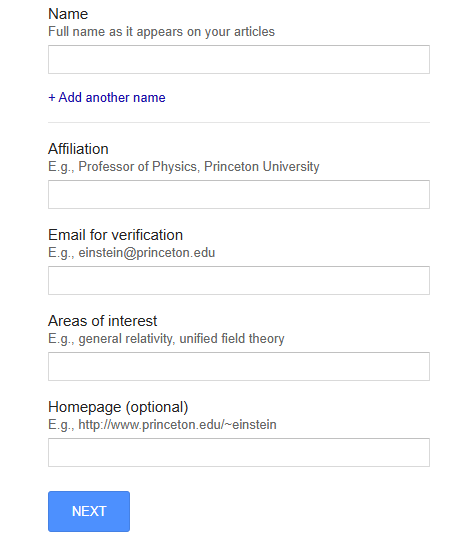
- Fill out the form (full name, affiliation, email, research areas, link to the website of the institution where you work) and click Next.
Step 3: Add your publications
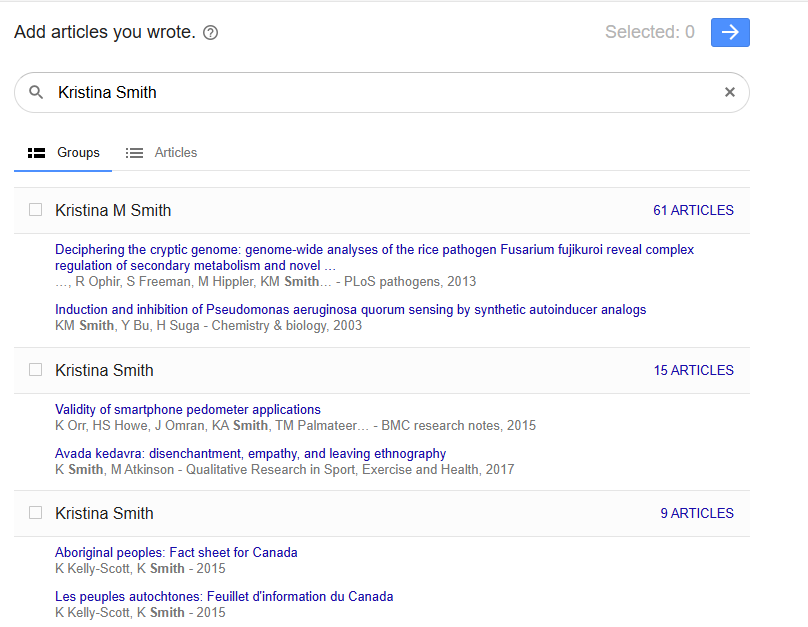
Next, the system will offer you a list of publications that may be associated with your name. To link them, you need to select the articles that belong to you and click on the blue arrow in the upper right corner.
Step 4: Setting up profile access
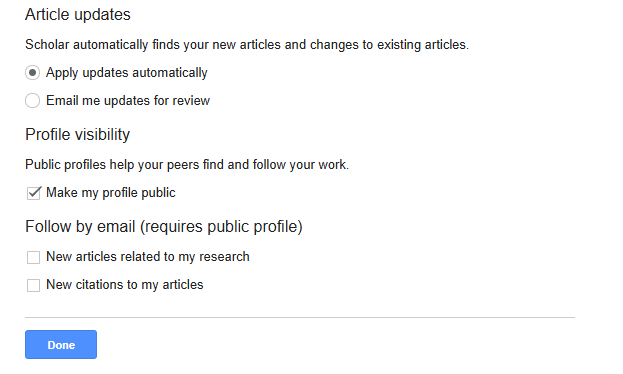
The final step is to set up your profile access. At this stage, Google Scholar will ask you to fill in three sections, namely:
- article updates (new publications will be automatically added to your profile, or you will first have to confirm the update via email);
- profile visibility (public or private);
- email notification settings (you will receive notifications about new citations of your articles and publications on similar topics).
How to increase the visibility of your profile on Google Scholar?
It is worth noting that creating a profile is only the first step a scientist should take. To maximise its visibility, it is extremely important to pay sufficient attention to its content. To do this, you need to follow a number of rules, in particular:
- Regular updates. Google Scholar tracks profile activity, which allows the system to evaluate the researcher's scientific activity and provide up-to-date information about them. To keep the profile accurate and up-to-date, it is recommended to regularly add new publications and check the correctness of the data provided.
- Academic email. Using a work email address that has been verified by Google Scholar increases the credibility of your profile.
- Check for duplicates. There are cases when the system may create duplicates of publications that are not linked to a specific author profile. To avoid such situations, you should delete such duplicate articles.
- Synchronise with ORCID. If you have an ORCID identifier, link it to your profile for better recognition of your work.
Creating a Google Scholar account is a simple process that takes a few minutes. However, its role in a scientist's career cannot be overestimated. An author profile will help you organise your publications, track citations, and find relevant scientific materials. By following these steps, you can effectively use Google Scholar to promote your research.
If you are experiencing difficulties optimising your Google Scholar profile and want to increase the number of citations, contact Scientific Publications. Our team will provide expert support and help you resolve any technical issues. To learn more about the service and get answers to your questions, fill out the form below. Our manager will contact you shortly and provide a free consultation. Together towards new scientific achievements!


